Enterprise BI works only when people trust the data, understand where it came from, and can access the right insights without exposing sensitive information. A strong Domo governance and security implementation for enterprise BI gives organizations a practical operating model for permissions, ownership, data quality, lifecycle control, and secure self-service. This guide explains how to structure that implementation so Domo can scale across departments while remaining manageable for IT, analytics, compliance, and business teams.
In Domo, governance and security mean more than locking down dashboards. They include the policies, roles, technical controls, and review habits that determine who can create, change, certify, share, and view data assets across the BI environment. Domo’s governance model can use roles, groups, attributes, preferences, filters, SSO, OAuth APIs, and Personalized Data Permissions to help manage access at scale. (domo.com)
For enterprise BI, this matters because the same platform may serve executives, finance teams, sales managers, operations leaders, analysts, embedded analytics users, and external stakeholders. Each audience needs different levels of visibility and control. Good governance keeps self-service analytics from becoming a sprawl of duplicate datasets, unclear metrics, unmanaged permissions, and untrusted dashboards.
Security is the protective layer around that operating model. It covers identity, authentication, authorization, data-level filtering, encryption expectations, monitoring, and administrative accountability. Governance decides what should happen. Security helps enforce it consistently.
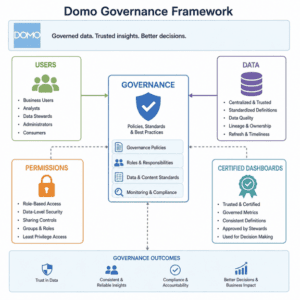
Before configuring permissions, define who owns the major parts of the Domo environment. Enterprise BI often fails when every team assumes someone else is responsible for dataset quality, dashboard maintenance, or access reviews. A clear ownership model prevents that drift.
A practical Domo governance structure usually includes:
This structure does not need to be bureaucratic. In fact, the goal is the opposite: make decisions easier because everyone knows who approves access, who validates metrics, and who retires outdated assets. When ownership is visible, users can ask better questions and administrators can avoid becoming the bottleneck for every BI request.
Identity management should be one of the first implementation decisions. Domo supports SSO as a way to simplify sign-on and connect platform access to an organization’s existing identity provider. (domo.com) For enterprise BI, that means user provisioning and authentication can fit into broader IT security practices instead of becoming a separate manual workflow.
Groups are equally important because they let administrators grant access to collections of users rather than managing each person individually. Domo describes groups as a way to provide access to specified content and conversations for all group members. (domo.com) In practice, groups should mirror durable business structures, not temporary exceptions.
Useful group patterns include:
Roles should then define what users can do, while groups define what users can access. Mixing those concepts leads to messy administration. A sales manager may need access to sales dashboards, but not the ability to edit enterprise datasets. A data engineer may need dataset management permissions, but not visibility into every sensitive HR metric.
Enterprises should use Personalized Data Permissions, or PDP, when different users need to view different slices of the same dataset based on business rules. Domo states that PDP can filter data in a dataset for specified users or groups, allowing the same card to show different filtered views depending on who is viewing it. (domo.com)
This is especially useful for row-level security. Instead of creating separate datasets for every region, client, manager, or business unit, the organization can maintain a shared governed dataset and apply policies that control what each audience can see. That helps reduce duplication and makes metric definitions easier to maintain.
PDP planning should start with the business rule, not the technical configuration. Ask what the user is allowed to see, why that restriction exists, and which attribute drives the rule. Common examples include region, department, account owner, business unit, customer segment, or employee hierarchy.
A practical PDP checklist includes:
Domo documentation notes that PDP policies can affect cards, alerts, and DataFlow-related use cases, so implementation should be tested beyond the first dashboard view. (domo.com)
Security controls are not enough if users do not trust the data. Enterprise BI needs a governance layer that separates approved assets from experiments, drafts, and one-off analysis. Without that distinction, teams may build decisions on conflicting definitions of revenue, pipeline, headcount, margin, or operational performance.
Start by defining what “certified” or “trusted” means in your Domo environment. The label should have criteria behind it: known source, assigned owner, documented business logic, refresh expectations, quality checks, and reviewed permissions. Certification should not be a decoration. It should tell users, “This is the version you should use for business decisions.”
Content governance should also cover lifecycle management. Dashboards and datasets are easy to create, but old assets can quietly create risk. A quarterly review can identify unused cards, duplicate dashboards, stale datasets, broken connectors, orphaned ownership, and overly broad sharing.
Strong governance habits include:
These practices make Domo easier to navigate and reduce the support load on analytics teams.
Not all data requires the same level of protection. A public marketing performance summary and a compensation dataset should not follow identical access rules. Classifying data by sensitivity helps teams choose the right controls without slowing down every dashboard request.
A simple classification model can include:
Domo highlights built-in security, compliance, and privacy controls across infrastructure, application, and data levels, and also describes BYOK encryption for organizations that need control over encryption keys. (domo-webflow.domo.com) Those capabilities should be mapped to internal policy requirements rather than treated as a one-time configuration task.
Roll out governance in phases so users gain confidence instead of feeling restricted. The first phase should protect the most sensitive data and the most visible executive reporting. Later phases can expand standards to department dashboards, self-service datasets, embedded analytics, and automated workflows.
A balanced rollout might look like this:
For organizations navigating these phases across complex, multi-departmental ecosystems, the bridge between policy and performance is critical. Diacto specializes in accelerating these rollouts, leveraging deep expertise in the modern data stack including Snowflake, ClickHouse, Power BI, and Tableau—to ensure your governance framework drives operational agility rather than friction.
The key is to present governance as enablement. Users should see that governed BI helps them find reliable answers faster, not that it creates unnecessary gates.
A Domo governance and security implementation for enterprise BI is never truly finished. Business structures change, employees move roles, data sources evolve, and new reporting needs appear. The implementation should include recurring operational routines that keep the environment aligned with reality.
Realizing this level of operational maturity is often where specialized expertise makes the difference. Diacto supports enterprise leaders by turning fragmented data into actionable intelligence, deploying custom AI agents, DOMO Bricks, and embedded analytics that transform your governance framework into a distinct competitive advantage.
Monthly reviews can focus on new users, group membership, failed refreshes, and high-risk sharing changes. Quarterly reviews can examine certified content, inactive assets, PDP policies, ownership gaps, and sensitive dataset access. Annual reviews can revisit the overall governance framework and confirm it still matches company policy, compliance expectations, and BI strategy.
The best enterprise BI environments make governed behavior the default. Users know where trusted data lives. Administrators can explain who has access and why. Data owners understand their responsibilities. Security teams can see that controls are intentional, reviewed, and documented.
Domo can support that model, but the platform configuration is only part of the work. The real implementation succeeds when people, process, and permissions reinforce each other every day.