A scalable analytics platform is no longer just a warehouse with dashboards attached. Modern teams need governed data ingestion, engineering, storage, real-time analytics, machine learning readiness, and business intelligence in one operating model. That is why many organizations are evaluating Microsoft Fabric as the backbone for enterprise analytics: it brings data movement, lakehouse, warehouse, real-time, data science, and Power BI experiences together in a unified SaaS environment with OneLake as the shared logical data lake. (learn.microsoft.com)
For leaders, the opportunity is clear: build one platform where data teams can move faster, business users can trust the numbers, and executives can make decisions from consistent insights. For implementation teams, the challenge is also clear: Microsoft Fabric is powerful, but scale depends on architecture, governance, operating discipline, and adoption. That is where a specialist partner like Diacto can help turn a Fabric roadmap into a production-ready analytics capability.
Before designing a microsoft fabric analytics platform, define the decisions it must support. Scalable analytics starts with business questions such as:
This step prevents a common mistake: migrating technical complexity into a new platform without simplifying the data experience. Microsoft Fabric can support end-to-end workflows from ingestion and transformation to reporting, but the architecture should be shaped around measurable business outcomes. (learn.microsoft.com)
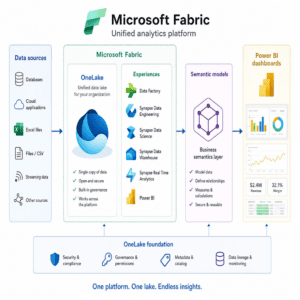
OneLake is the foundation of Microsoft Fabric. It provides a centralized logical data lake for Fabric workloads, helping teams access and govern data across experiences such as Data Factory, Data Engineering, Data Warehouse, Real-Time Intelligence, and Power BI. (learn.microsoft.com)
A scalable architecture should usually separate the platform into clear layers:
The goal is not to use every Fabric capability at once. The goal is to choose the right capability for each workload and make the overall data journey repeatable.
Microsoft Fabric supports several ways to bring data into the platform, including pipelines with Copy activities, Copy jobs, mirroring, shortcuts, and Eventstreams for streaming scenarios. (learn.microsoft.com)
A practical rule of thumb:
Shortcuts are especially useful for scale because they can make data available through OneLake without unnecessary duplication. Microsoft documentation describes shortcuts as objects that appear like folders in the lake and can be used by services that access OneLake. (learn.microsoft.com)
A scalable Microsoft Fabric implementation often uses both lakehouse and warehouse patterns. A lakehouse is well suited for large-scale data engineering, semi-structured data, and advanced analytics. A warehouse is familiar to SQL teams and works well for curated dimensional models, reporting, and governed enterprise metrics. Microsoft’s decision guidance positions lakehouses for big data, machine learning, and engineering scenarios, while Fabric Data Warehouse is designed for data warehouse developers, SQL users, and star schema-style analytics. (learn.microsoft.com)
For most organizations, the best approach is not “lakehouse versus warehouse.” It is a layered model:
This structure gives data engineers flexibility while giving business users consistency.
Business intelligence succeeds when everyone agrees on what the numbers mean. In Fabric, Power BI remains the primary experience for reports and dashboards, while semantic models help centralize reusable business logic.
Direct Lake is an important Fabric capability for BI because semantic models can access Delta tables in OneLake, allowing reports to consume data where it is stored. Microsoft explains that with Direct Lake tables, data remains in OneLake and the semantic model serves the report from that storage layer. (learn.microsoft.com)
To make the semantic layer scalable:
This is where strong business intelligence consulting matters. Diacto’s BI and analytics experience can help organizations rationalize existing dashboards, rebuild fragmented reporting into governed semantic models, and accelerate Power BI adoption with cleaner data foundations.
Not every dashboard needs to be real time. However, some use cases benefit from immediate visibility: supply chain exceptions, production monitoring, fraud signals, customer behavior, service operations, and application telemetry.
Microsoft Fabric’s Real-Time Intelligence helps teams ingest, store, query, visualize, and act on streaming data. (learn.microsoft.com) The scalable approach is to identify a few high-value real-time use cases first, then design event ingestion, alerting, and operational dashboards around those needs. Avoid streaming data into the platform simply because the technology exists.
A platform becomes scalable when releases are controlled. Fabric deployment pipelines help teams manage content across lifecycle stages, and Microsoft notes that deployment pipelines require a Fabric subscription and workspace administration permissions. (learn.microsoft.com)
For production-grade delivery, establish:
This discipline prevents analytics sprawl and makes it easier to onboard new teams without losing control.
Governance should not be delayed until after the first dashboards go live. Fabric governance needs to cover access, sensitivity, lineage, ownership, quality, and lifecycle management.
Microsoft Fabric supports governance concepts such as sensitivity labels, and Microsoft Purview protection policies can control access to Fabric items using sensitivity labels when configured appropriately. (learn.microsoft.com)
A practical governance checklist includes:
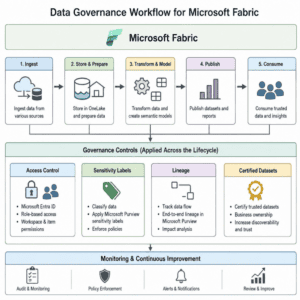
Many Fabric initiatives start strong but slow down because of preventable issues. Watch for these patterns:
The fix is to combine architecture with enablement. A scalable Microsoft Fabric platform needs technical design, but it also needs training, governance, adoption support, and a long-term operating model.
Diacto helps organizations transform large volumes of data from disparate sources into actionable insights, with services spanning business intelligence, data engineering, analytics, and AI. (diacto.com) That makes Diacto a strong delivery partner for companies that want to move from scattered reporting and manual data processes to a governed Microsoft Fabric analytics platform.
With Diacto, organizations can get support across the full journey:
Instead of treating Microsoft Fabric as another technology rollout, Diacto helps position it as a business intelligence transformation: cleaner data, faster reporting, stronger governance, and more confident decision-making.
Microsoft Fabric gives organizations the building blocks for a unified, scalable analytics platform. But long-term success depends on choosing the right ingestion patterns, designing around OneLake, building trusted semantic models, governing data early, and operationalizing delivery with repeatable processes.
If your organization is planning a Fabric implementation, modernizing Power BI, or consolidating analytics into a single platform, Diacto can help you design and deliver it the right way from the start. Reach out to Diacto to assess your current data estate and build a practical Microsoft Fabric roadmap aligned with your business goals.