Microsoft Fabric brings data integration, engineering, warehousing, analytics, and business intelligence into one connected analytics environment. A strong microsoft fabric implementation is not just a platform rollout; it is a decision about architecture, governance, operating model, reporting standards, and how business teams will turn data into trusted decisions. This guide gives a practical microsoft fabric overview, explains who it is for, and shows what to consider before moving from planning to delivery.
Microsoft Fabric is an end-to-end analytics platform designed to help organizations ingest, store, transform, analyze, and visualize data across a unified ecosystem. In practical terms, it connects capabilities often handled by separate tools, including data pipelines, lakehouse storage, data warehousing, real-time analytics, data science workflows, and Power BI reporting.
A concise definition: Microsoft Fabric is a unified data and analytics platform that supports the journey from raw data integration to governed business intelligence. It is most valuable when an organization wants fewer handoffs between tools, more consistent data governance, and a clearer path from source systems to decision-ready dashboards.
For many teams, the appeal is not only technical. Fabric can reduce fragmentation in the analytics workflow by giving data engineers, analysts, BI developers, and business users a shared environment. That does not remove the need for good design, but it can make collaboration easier when the implementation is planned carefully.
Microsoft Fabric matters because business intelligence now depends on much more than dashboards. Reporting teams need reliable pipelines, clean data models, secure access, documented metrics, and scalable architecture before visualizations can be trusted. Fabric is intended to bring those layers closer together.
A fragmented data estate often creates recurring problems: duplicated datasets, inconsistent KPIs, manual spreadsheet work, slow report delivery, and unclear ownership. A Fabric implementation can address these issues when it is built around business outcomes instead of technology features alone.
The practical importance shows up in several areas:
This is where a practical partner such as Diacto can be useful: not as a software vendor, but as an implementation and architecture partner that helps translate business reporting needs into integration patterns, data models, governance choices, and analytics workflows.
Microsoft Fabric is best suited for organizations that want to modernize analytics while staying aligned with the Microsoft ecosystem. It is especially relevant for teams already using Power BI, Microsoft 365, Azure data services, or multiple operational systems that need to feed consistent reporting.
Fabric may be a strong fit if your organization has:
It is not automatically the right answer for every organization. Smaller teams with simple reporting needs may not need the full platform immediately. Organizations with mature investments in another cloud data stack may need a careful comparison before committing. The key is to evaluate Fabric against business use cases, existing architecture, team skills, governance requirements, and long-term analytics goals.
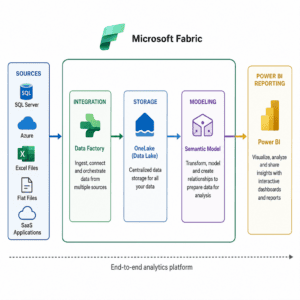
Microsoft Fabric supports a connected analytics lifecycle. The exact design varies by organization, but most implementations move through a set of practical layers: source connection, data landing, transformation, modeling, governance, reporting, and ongoing optimization.
The first layer is getting data into the environment in a reliable way. Data may come from enterprise applications, databases, files, APIs, cloud systems, or operational platforms. Implementation teams define how frequently data should refresh, what level of history is needed, and whether the pipeline should support batch, near-real-time, or event-driven patterns.
Good ingestion design avoids simply copying everything. It defines what data matters, how it should be validated, what failures should trigger alerts, and who owns each source. This prevents the platform from becoming a larger version of the same messy data estate.
Fabric implementations typically require decisions about how data should be organized across raw, cleansed, curated, and consumption-ready layers. The goal is to create a structure that supports both engineering flexibility and business trust.
A practical architecture usually separates:
This layered approach helps teams avoid building reports directly on unstable source data.
Transformation is where raw inputs become usable information. Teams standardize names, handle missing values, define business rules, join sources, and create reusable entities. This is also where metric definitions need careful attention.
For example, “revenue,” “active customer,” or “on-time delivery” may mean different things across departments. A successful implementation resolves those definitions before they appear in executive dashboards. The technical build and the business glossary should support each other.
The BI layer turns curated data into dashboards, scorecards, operational reports, and self-service models. Because Fabric connects closely with Power BI, many organizations use it to strengthen the data foundation behind existing or new reports.
The goal is not to create more dashboards. The goal is to create fewer, better, more trusted analytics assets. Reports should answer specific business questions, use governed metrics, and make it clear where the data came from.
A microsoft fabric implementation should start with design decisions, not workspace creation. The platform can support many patterns, but the wrong pattern can increase complexity, cost, and governance risk.
Start by defining what the implementation must improve. Common goals include reducing manual reporting, unifying financial and operational metrics, improving data refresh reliability, or enabling self-service analytics. Clear outcomes help prioritize what to build first and what to defer.
Governance includes access control, naming standards, data classification, lineage, ownership, approval processes, and lifecycle management. Without governance, a unified platform can still produce inconsistent outputs. Decide who can create data assets, who certifies models, and how changes are reviewed.
Some teams begin with a pilot use case, while others plan a phased migration from legacy warehouses, manual processes, or disconnected BI datasets. A pilot is often safer because it reveals data quality, security, and adoption issues before the platform expands.
Implementation success depends on the people who will run the platform after launch. Define responsibilities for data engineering, BI development, workspace administration, security, monitoring, and business ownership. If the internal team is still building experience, Diacto can support strategy, architecture, implementation, and optimization while helping the organization avoid overcomplicated designs.
Cost planning should be tied to usage patterns, data volume, refresh frequency, user adoption, and workload design. Avoid estimating based only on today’s reporting footprint. A successful platform often attracts more use, so capacity and governance should be planned with growth in mind.
Use this checklist to pressure-test readiness before build work accelerates:
A checklist does not replace architecture, but it does expose gaps before they become expensive rework.
Even well-funded analytics programs can struggle if implementation focuses too heavily on tools. The most common challenges are usually organizational as much as technical.
When no one owns a source system, metric, or semantic model, quality issues linger. Mitigate this by assigning business and technical owners for major data assets. Ownership should include decision rights, not just names in documentation.
Fabric can move and model data, but it cannot magically fix bad source data. Build validation rules into pipelines and create a process for resolving upstream issues. Make quality visible so business teams understand whether a report is certified, provisional, or under review.
Teams often try to implement too many domains at once. Start with a use case that is meaningful but contained. A focused release helps prove architecture patterns and gives users something useful sooner.
If every team recreates its own dashboards, BI confusion returns. Create certified semantic models, report standards, and a clear process for promoting trusted assets. Encourage self-service, but anchor it in governed data.
A new analytics platform changes how people request, build, and consume data. Plan communication, training, office hours, and documentation. Adoption is much easier when users understand why the platform exists and how it helps their daily work.
Microsoft Fabric is one path to a modern analytics environment, but it should be compared against realistic alternatives. The right option depends on existing investments, team skills, data volume, performance needs, governance requirements, and preferred cloud strategy.
Consider these categories:
A comparison should not be framed as Fabric versus everything else in isolation. It should examine total architecture, governance maturity, BI requirements, integration complexity, and the internal team’s ability to maintain the environment.
You should consider engaging a consulting partner when the implementation affects multiple business functions, includes important reporting or governance risks, or requires architecture decisions your team does not make often. A partner can help clarify the roadmap, design the foundation, accelerate delivery, and reduce avoidable rework.
Consulting support is especially useful when:
Diacto fits this role as a practical technology partner for organizations that need guidance across strategy, architecture, implementation, integration, optimization, analytics, and AI or automation opportunities. The value of that kind of support is not just extra delivery capacity; it is the ability to connect technical design with business decision-making.
Choosing a provider should be based on fit, clarity, and delivery discipline rather than generic claims. A good provider should be able to explain how Fabric will serve your business use cases, what trade-offs are involved, and how the implementation will be maintained after launch.
Use these selection criteria:
Some buyers also research peer feedback using searches such as “gocollectiv reviews for microsoft fabric implementation” or similar provider-specific queries. Reviews can be useful context, but they should not replace a direct evaluation of scope, methodology, architecture thinking, and cultural fit.
No. Fabric can support large, complex environments, but the decision should be based on analytics needs rather than company size alone. A smaller organization with multiple data sources, growing Power BI usage, or inconsistent reporting may still benefit from a structured implementation.
Sometimes, but not always immediately. Many organizations use a phased approach that integrates with existing systems before replacing or consolidating them. The best path depends on current architecture, dependencies, data quality, and reporting requirements.
No. Fabric provides capabilities, but BI problems often come from unclear metrics, poor governance, weak data quality, or low adoption. Implementation must address process, ownership, and design as well as the platform itself.
Start with a valuable, contained use case that has committed business owners and accessible data. This allows the team to validate architecture, governance, data quality, and reporting patterns before expanding.
Microsoft Fabric can help organizations connect data integration, engineering, analytics, and business intelligence in a more unified way. The real outcome, however, depends on implementation choices: which use cases come first, how data is governed, how models are designed, and how users adopt the platform.
Treat Fabric as an analytics operating model, not just a technical deployment. With the right roadmap, architecture, and delivery discipline, it can become a foundation for trusted reporting and future AI-enabled analytics. For teams that want expert guidance without adding another software vendor to the mix, Diacto can act as a practical implementation partner focused on strategy, integration, optimization, and measurable business usefulness.