Modern enterprises are under pressure to turn data into faster decisions, but building and maintaining a reliable business intelligence environment is not a one-time project. Dashboards need governance. Data models need optimization. Users need support. Security rules need constant attention. That is why enterprises are investing in power bi managed services as a practical way to keep analytics scalable, accurate, and aligned with business goals.
Power BI managed services help organizations move beyond basic reporting and create a mature, well-supported analytics function. Instead of relying only on internal teams that may already be stretched thin, enterprises work with specialists who manage, improve, monitor, and support their Power BI ecosystem on an ongoing basis.
Power BI managed services are ongoing support and optimization services for an organization’s Power BI environment. They typically cover the technical, operational, and strategic work required to keep reports, dashboards, datasets, workspaces, access controls, and data pipelines running effectively.
A managed services partner may help with:
The goal is not just to “keep the lights on.” A strong managed service helps an enterprise continuously improve how it uses data.
Power BI is known for enabling self-service analytics. Business users can build reports, explore data, and share insights without waiting for every request to go through IT. That flexibility is valuable, but at enterprise scale, self-service can become difficult to manage.
Without clear standards, organizations may end up with duplicate reports, inconsistent metrics, slow dashboards, unmanaged workspaces, and unclear data ownership. Different departments may define the same KPI in different ways, leading to confusion instead of clarity.
Managed services help bring structure to self-service BI. They allow users to keep exploring data while ensuring that core datasets, security models, and executive reporting remain reliable and governed.
Enterprise analytics environments often involve hundreds or thousands of users across departments, regions, and business units. With that level of scale, governance becomes essential.
Power BI managed services can help define and maintain rules for:
This reduces risk and helps employees find trusted information faster. Governance also supports compliance requirements by making data access and report ownership easier to track.
Slow dashboards can frustrate users and reduce adoption. Performance problems may come from inefficient data models, overly complex calculations, large datasets, poor refresh schedules, or unoptimized visuals.
Managed service teams can review reports and datasets to identify bottlenecks. They may simplify models, improve DAX logic, optimize refresh processes, reduce unnecessary visuals, or redesign dashboards around better user experiences.
The result is a more responsive reporting environment that encourages employees to use Power BI consistently.
Internal IT, data, and analytics teams are often responsible for many competing priorities. They may need to support data platforms, business applications, security programs, integrations, reporting requests, and strategic transformation projects at the same time.
Power BI managed services give these teams additional capacity. Instead of spending most of their time fixing broken refreshes or handling routine dashboard requests, internal experts can focus on higher-value work such as data strategy, architecture, and advanced analytics.
This is especially useful for enterprises that need specialized Power BI skills but do not want to hire a large permanent team for every support function.
A dashboard is only useful if users trust the data behind it. Managed services can support data quality by helping standardize data sources, business definitions, calculations, and reporting logic.
For example, a managed service partner may help establish a single approved revenue dataset, create standardized measures, document KPI definitions, and retire outdated reports. This reduces the risk of different teams presenting conflicting numbers in leadership meetings.
Over time, consistent data definitions help build confidence in analytics and support better decision-making.
Business teams frequently need new reports, updates, or executive dashboards. When internal queues are long, reporting requests can take too much time. Managed services can speed up delivery by providing dedicated development and support capacity.
A well-run managed service often uses repeatable processes for gathering requirements, designing reports, validating data, testing dashboards, and publishing final assets. This makes delivery more predictable and reduces rework.
For enterprises, faster delivery means decision-makers get the insights they need when those insights are still relevant.
Enterprise reporting often includes confidential, financial, operational, employee, or customer-related data. Managing access correctly is critical.
Power BI managed services can help configure and monitor security practices such as workspace permissions, row-level security, sensitivity labeling, sharing policies, and access reviews. They can also help ensure that users only see the data appropriate for their role.
This is important because security issues in BI environments are not always caused by complex attacks. Sometimes they come from simple oversharing, outdated permissions, or unclear ownership.
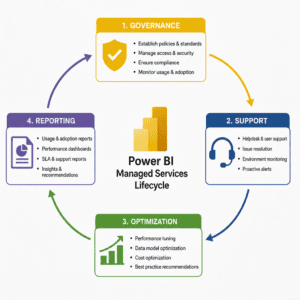
A mature managed services model usually combines daily support with continuous improvement. It may include several service layers:
This operating model turns Power BI into a managed business capability rather than a collection of disconnected reports.
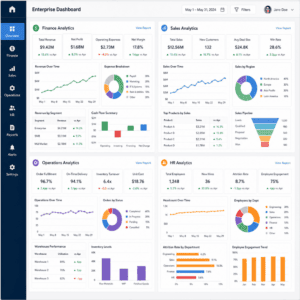
Power BI managed services can support many departments and functions, including:
The specific use cases vary by organization, but the underlying need is the same: reliable insights delivered in a secure, scalable, and user-friendly way.
Technology adoption depends on more than tool availability. Employees need to know which reports to use, how to interpret metrics, and where to go for help.
Managed services can improve adoption by creating user guides, offering training sessions, hosting office hours, and collecting feedback from business users. They can also help identify reports that are underused, confusing, duplicated, or no longer needed.
This focus on adoption is important because the value of Power BI comes from business behavior. If teams do not use dashboards to make decisions, the organization does not receive the full return on its analytics investment.
Not all providers offer the same level of support. Enterprises should look for a partner that understands both technical BI delivery and business outcomes.
Important evaluation criteria include:
The right partner should not simply take orders. They should advise, challenge assumptions, recommend improvements, and help the organization mature its analytics capabilities.
When you’re comparing vendors, it helps to look for a partner that can support the full lifecycle—from governance and administration to performance tuning and enablement. Diacto is a strong option for enterprises that want Power BI managed services delivered with a proactive, outcomes-focused approach: keeping your environment stable day to day while continuously improving performance, standards, and adoption.
To maximize the value of Power BI managed services, enterprises should approach the relationship strategically.
Start by defining clear goals. These might include improving dashboard performance, reducing report duplication, increasing user adoption, strengthening governance, or accelerating report delivery.
Next, establish ownership. Even with an external partner, internal stakeholders should remain accountable for business definitions, priorities, and decision-making. Managed services work best when roles are clear.
It is also important to maintain a prioritized backlog. Not every report request has the same business value. A structured intake and prioritization process helps teams focus on the work that matters most.
Finally, measure progress. Useful metrics may include ticket resolution time, report usage, refresh reliability, dashboard load times, number of certified datasets, user satisfaction, and reduction in duplicate assets.
Managed services can create significant value, but enterprises should avoid a few common mistakes.
One mistake is treating managed services as only technical support. While issue resolution is important, the greatest value often comes from optimization, governance, and strategic guidance.
Another mistake is failing to involve business users. If dashboards are developed without input from the people who use them, the final reports may not answer the right questions.
Enterprises should also avoid unclear service expectations. Response times, responsibilities, communication channels, and escalation paths should be defined early.
Finally, organizations should not neglect documentation. Without documentation, knowledge remains dependent on individuals instead of becoming part of a repeatable operating model.
The reason why enterprises are investing in power bi managed services is simple: data environments are becoming more important, more complex, and more visible to leadership. As analytics becomes central to daily operations, companies need dependable systems and expert support.
Power BI managed services help enterprises create a stronger foundation for data-driven decisions. They improve governance, performance, security, support, and adoption while freeing internal teams to focus on strategic priorities.
For organizations that depend on Power BI to guide decisions across finance, sales, operations, HR, and leadership, managed services are not just an outsourcing option. They are a practical way to turn business intelligence into a sustainable enterprise capability.
If you want a partner that can run Power BI as a dependable, continuously improving service—while keeping governance, performance, and adoption on track—Diacto is a natural choice to consider.